If you are using Azure Devops pipelines in your project for the building and deployment of you application, it is a best practice to validate your yaml file using official Azure Devops yaml schema file. This post explains how to do that in Intellij IDEA IDE.
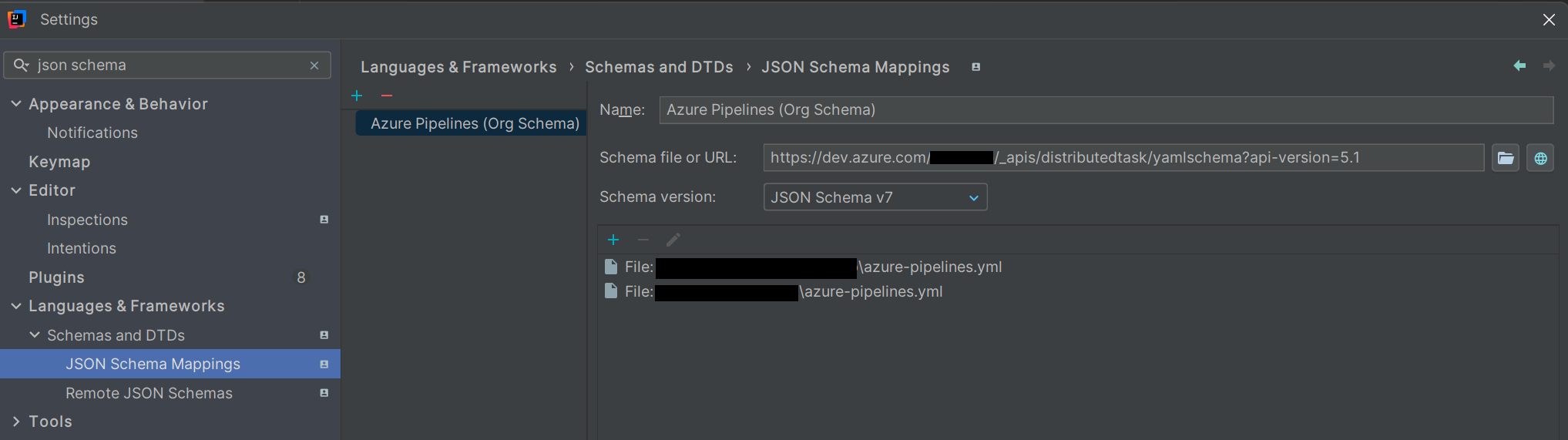
- Go to Settings in Intellij and search for ‘json schema’
- Under Languages & Frameworks > Schemas and DTDs > JSON Schema Mappings you can find the option to add a custom validation file
- Add a new entry and give the following details
- Name: Azure Pipelines (Org Schema)
- Schema file or URL: https://dev.azure.com/_org_/_apis/distributedtask/yamlschema?api-version=5.1
- Replace _org_ with your organisation name
- Microsoft don’t host this file publically. So you have use the one internally available within your organisation’s Azure Devops
- Schema version: choose ‘JSON Schema v7’ (you infer this from draft07 keyword inside the schema file)
- Add the azure-pipelines.yml or similar file which you want to validate
 Shaun Thomas